It started with Sentry alerts.
Multiple services failing at the same time:
cannot execute INSERT in a read-only transaction
cannot execute DELETE in a read-only transaction
cannot execute SELECT FOR UPDATE in a read-only transaction
The decoder worker was crashing. Redis health checks failing. Background workers restarting. One pod had restarted over 100 times.
My first thought: database credentials issue. Bad connection string. Wrong replica. Prisma bug.
Something in the application code was broken.
The Debugging
I checked what databases each service was using:
kubectl exec deployment/backend-api -- printenv DATABASE_URL
kubectl exec deployment/decoder-worker -- printenv DATABASE_URL
Main API connected to Database A. Decoder worker connected to Database B. Completely different databases.
Yet both were failing with read-only errors.
That's when I stopped blaming the application.
I SSH'd into a running container and ran:
SHOW transaction_read_only;
Result: on
Then:
SELECT current_database();
SELECT current_user();
SELECT pg_is_in_recovery();
All normal. The right database, right user, primary node (not a replica). Everything looked correct except the database was stubbornly read-only.
The Breakthrough
I checked Azure Resource Health.
There it was:
Azure Database for PostgreSQL Flexible Server
Status: Degraded
Cause: PlatformInitiated
The Azure Database for PostgreSQL Flexible Server is set to read-only state.
Azure itself had forced the database into read-only mode.
I verified where this setting came from:
SHOW default_transaction_read_only;
Source: /datadrive/pg/data/postgresql.auto.conf
This proved the application didn't enable read-only. Azure did.
Why Azure Did This
I checked storage metrics:
Provisioned: 32 GB
Actual usage:

sensor_ppg_raw:  ~15 GB
sensor_data:     ~6 GB
sensor_bioz_raw: ~1.7 GB
sensor_eda_raw:  ~1 GB
sensor_mic_raw:  ~466 MB

Total: ~25+ GB
The database was running out of space. Azure's platform automatically forced read-only mode as a protective measure.
Storage pressure + infrastructure conditions = database lockdown.
The Fix
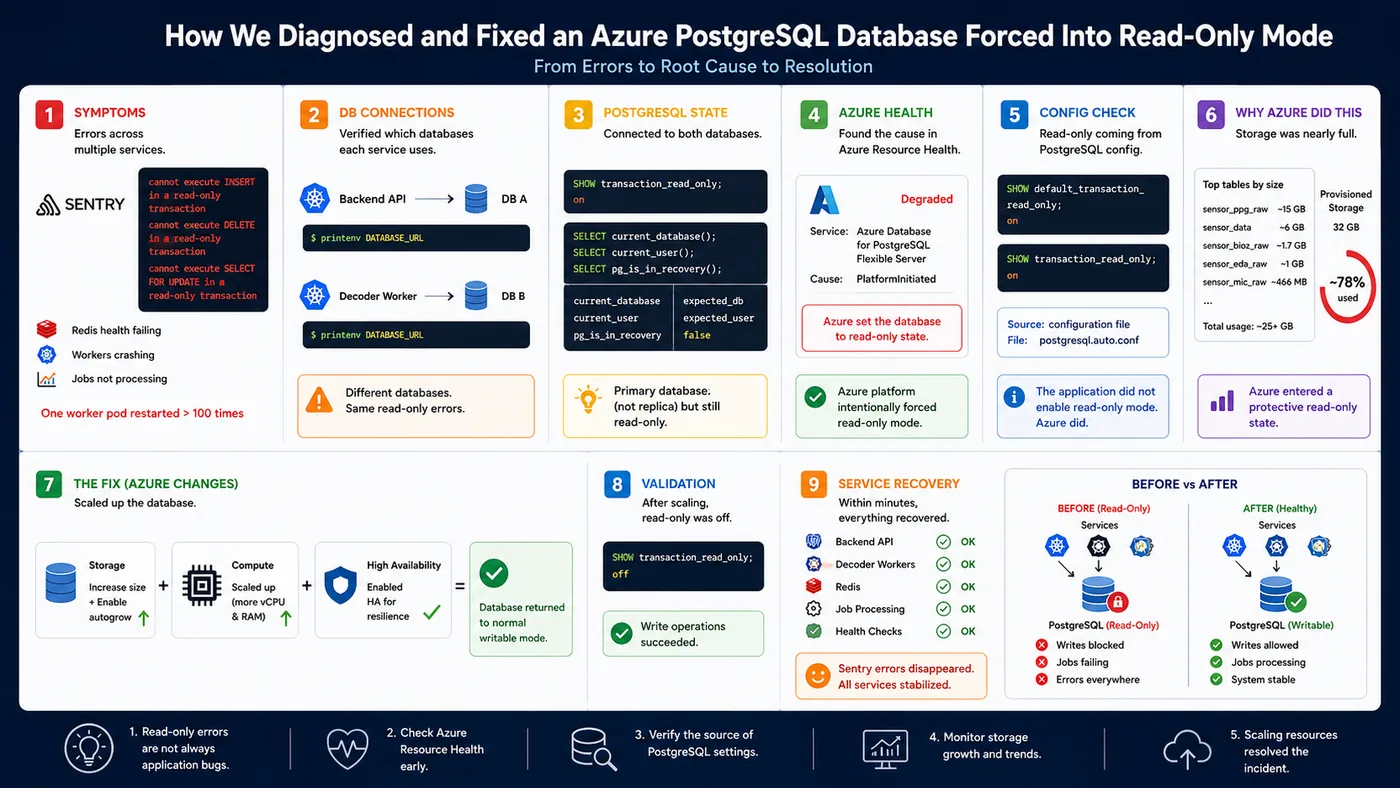
I scaled resources:
- Storage — Enabled autogrow and increased capacity
- Compute — Scaled from 2 vCPU/8GB RAM to a larger tier
- High Availability — Enabled for better resilience
After Azure completed the scaling operation:
SHOW transaction_read_only;
Result: off
Within minutes everything recovered:
- Decoder workers stopped crashing
- Health checks returned green
- Job queues resumed
- Sentry went quiet
The database write just needed more breathing room.
What I Actually Learned
1. Read-only errors aren't always application bugs
When multiple unrelated services suddenly fail with cannot execute INSERT, check infrastructure first.
2. Check resource health early
Azure Resource Health had the answer before I did. Should've looked there immediately instead of hunting through Prisma code.
3. Verify the source of PostgreSQL settings
This query saved hours:
SHOW default_transaction_read_only;
Combined with checking where the setting came from (postgresql.auto.conf), it proved the platform—not the app—enabled read-only mode.
4. Monitor storage growth proactively
Raw sensor ingestion tables consumed the vast majority of storage. A simple alert on table growth would've prevented this entirely.
5. Sometimes the fix isn't code
I spent hours expecting to deploy a fix. The actual fix was:
- More disk
- More CPU
- Enable HA
No pull request. No code review. Just scale the infrastructure.
The Debugging Path
Wrong → Right:
Application bug (assumption)
  ↓
Database credentials (checked)
  ↓
Prisma transaction logic (checked)
  ↓
PostgreSQL configuration (checked)
  ↓
Azure Resource Health (found it)
  ↓
Platform-level read-only enforcement (actual cause)
This is why production debugging should move application → database → platform, not assume the code is always guilty.
In this case, every application symptom traced back to the platform itself.
That incident taught me to look at infrastructure health first when multiple services fail at once. The code is probably fine. The platform is telling you something.